

You may have working mobile data for most of a China trip and still encounter a difficult thirty minutes: immediately after landing, inside a station, during account verification, or when one service will not load. The useful goal is not to make your entire trip permanently offline. It is to keep the next essential action possible while you reconnect or ask for help.
The standard: “downloaded” is not the same as “ready.” A resource is ready only after you can find it, open it, and use it with Wi-Fi and mobile data turned off.
1. Build one offline arrival card
Create a short note that answers the questions you are most likely to face before your phone has a reliable connection. Keep it available from the lock screen only if it contains no sensitive identity or payment information.
- your hotel name in English and Chinese;
- the full Chinese address and hotel phone number;
- your arrival airport or station, terminal, and local arrival time;
- the confirmed transfer plan and one backup;
- a trusted contact and the relevant embassy or consulate contact;
- one short Chinese sentence explaining where you need to go.
Keep this card separate from copies of your passport and other sensitive documents. The U.S. Department of State travel checklist recommends making multiple copies of important travel documents and storing them separately from the originals. Travelers of other nationalities should follow the equivalent advice from their own government.
2. Save proof, not just links
An email link or booking-app notification may be useless if it opens to an account screen that needs a connection. Save a readable local copy of each confirmed item you may need on arrival:
- flight or train number, date, local time, terminal or station, and booking reference;
- accommodation name, address, check-in window, and confirmation number;
- ticket details and the provider's instructions for identification or collection;
- insurance policy number and emergency contact method.
A screenshot can be a useful fallback, but it is not a universal substitute for a passport, visa, original ticket, or official booking record. Keep the required original and verify current rules with the issuing authority.
3. Prepare translation in three layers
| Layer | Prepare before departure | Use it for |
|---|---|---|
| Readable phrase | Save the Chinese text in a large font | Hotel address, directions, or a simple request |
| Original image | Keep the uncropped sign, menu, or booking screenshot | Showing context when recognition or translation is unclear |
| Downloaded tool | Install any supported language or offline pack and open it once | Selected camera or face-to-face translation moments |
Do not improvise safety-critical wording at the last moment. For allergies, medical needs, legal matters, or emergencies, prepare a short message in advance and have it checked by a qualified or fluent person when an error could cause harm. Our Chinese menu translation guide explains how to keep the original dish context visible and separate translation from confirmation.
4. Keep essential information outside a single app
A resilient setup should survive one failed login, expired session, unavailable service, or lost phone. Store important information in at least two appropriate places, such as a protected offline file and a paper copy carried separately. Share the minimum necessary itinerary and contact information with a trusted person at home.
The current UK government foreign travel checklist recommends having a backup plan for accommodation, flight, passport, contact, and insurance information, including a plan for losing access to your phone. It also recommends preparing an alternative when your main payment method fails.
5. Check connectivity before you depend on it
International roaming, travel eSIMs, local SIMs, and SMS verification can behave differently by carrier, phone model, account, and destination. Before departure:
- confirm that your phone is compatible with the connectivity option you plan to use;
- check whether your home number can still receive the messages needed for account verification;
- write down the activation steps somewhere that does not require the same connection;
- avoid making a single unfamiliar network or account your only arrival plan.
Update the phone and essential apps before travel, then recheck destination-specific technology and safety guidance from your own government. The U.S. Department of State's China information, for example, advises travelers to update device software before departure and explains China-specific network and device-security considerations.
6. Know what TravelPanda can do offline
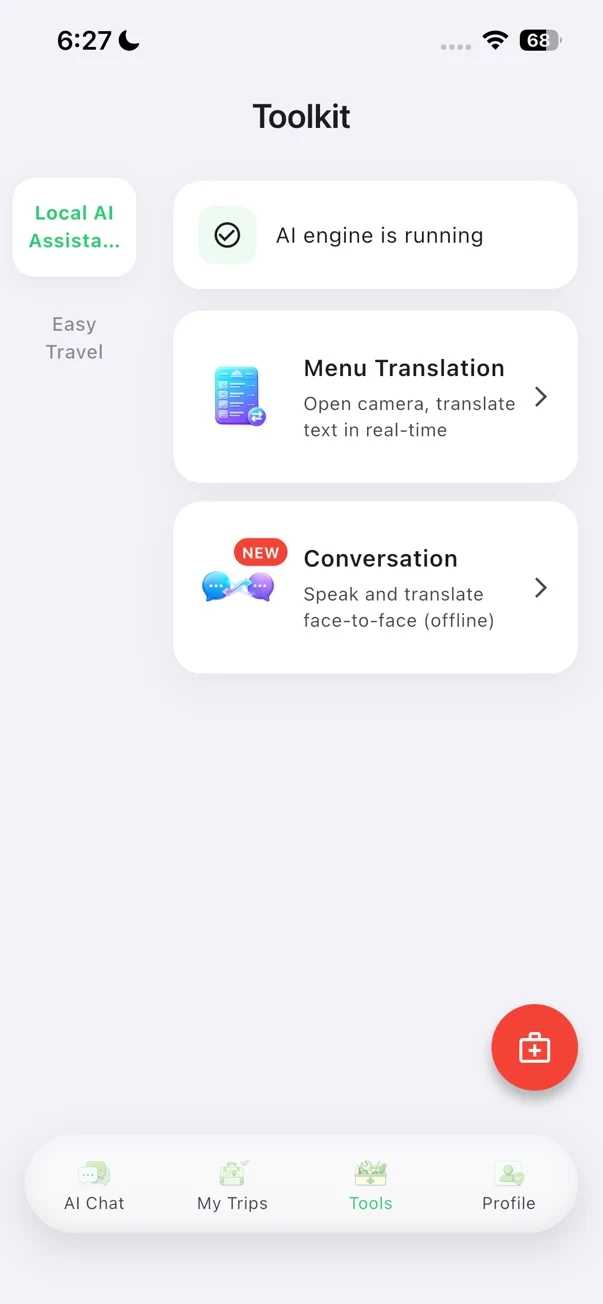
On compatible mobile devices, TravelPanda's optional Offline Kit supports selected menu and face-to-face conversation translation scenarios. Download the kit before the trip, let the installation finish, and test the relevant tool without a network while you still have time to troubleshoot.
Availability varies by device and language. The Offline Kit or related functions may require a membership or in-app purchase, and online itinerary, search, or AI capabilities still need a connection. It is a prepared fallback for selected moments, not a claim that every TravelPanda feature or every travel service works offline.
7. Run a ten-minute airplane-mode test
- Charge the phone, then turn on airplane mode and leave Wi-Fi off.
- Open your arrival card and find the hotel name, Chinese address, and phone number.
- Open the local copy of your first booking and identify the reference number.
- Display one prepared Chinese phrase at a size another person can read.
- Open any offline map, language resource, or TravelPanda tool you intend to rely on.
- Find your emergency contacts without searching the web.
- Restart the phone in airplane mode and repeat the two most important checks.
If any step fails, fix that specific gap and repeat the test. This short rehearsal is more valuable than collecting another folder of apps you have never opened.
A compact departure checklist
- Offline arrival card completed and readable
- Confirmed bookings saved locally
- Sensitive document copies protected and separated
- Chinese hotel address and essential phrases prepared
- Connectivity activation steps saved
- Offline resources downloaded, opened, and tested
- Emergency contacts available without internet
- Airplane-mode rehearsal passed on the travel phone
For the rest of the phone setup—payments, transport, maps, and itinerary organization—continue with the China travel app checklist.